platform-id="06casd1c-18c3-44fc-8531-c869753d4346"
user-id="5955912312324486923"
chatbot-id="13fdsd38b-a832-46e0-a946-605858588f90"
gtm-id="GTM-MT398K" // <-- this was added
>
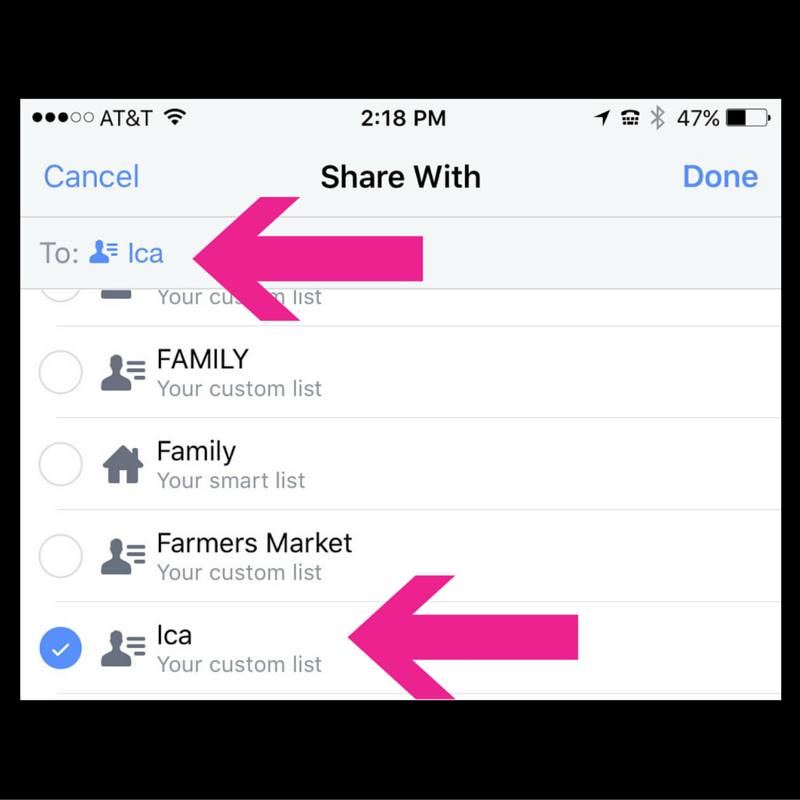
Next, choose the audience that you want to reach with your broadcast.
Give your broadcast a good title; make people curious.
Once you are live, find your self on your laptop, desktop, or second device and click "share". One caveat: if you want to share from your personal profile to other places, only the people who are the original list will be able to see it elsewhere, so you may at that point want to change the privacy settings to "public".

Notice the options! So cool, right? You can share into a group (OR MORE THAN ONE), AND you can share to one (OR MORE) Facebook pages that you manage. HOW COOL IS THAT?
In the image below, I am streaming live in my Facebook group, The Front Row.
...and here I am simultaneously streaming to my business page. (Mustache added to mask goofy/unflattering grimace.) :)
In summary, the main benefit from streaming from your Facebook profile is that you can select exactly who you want to see it. This is great if you only want existing clients, for example, to see what you are posting. Or maybe you want everyone EXCEPT existing clients to see. The possibilities are numerous. How will you use this feature?